
Pic Measure
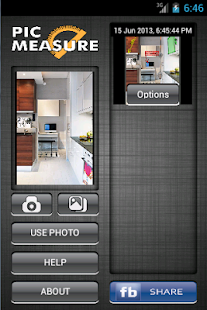
Pic Measure is a handy and very useful tool to add measurements objects, area objects and their dimensions on your pictures.
It has a very simple and self-explanatory interface which enables you to focus more on your actual needs of adding measurements.
( Most useful to : architects, interior designers, civil engineers, carpenters, real estate agents and people in various construction related works.
)
Features:
- Add unlimited measurement objects on an image, like
- Lines - Angles - Callouts ( these are text boxes with arrow which can be used to point any area of interest on your image ) - Elliptical/Circular Area - Triangular Area - Quadrilateral Area ( you can modify this to make it a square, rectangle, trapezoid, rhombus, parallelogram or any arbitrary shape as you require.
)- Add your own texts on the measurement objects.
Measurements objects support unrestricted entry of characters which enables you to write any value, unit or text as you desire ( e.g.
mm, cm, m, km, inch, feet, 12 mm, 45.30 meters, Kitchen Area, and lot more...
)
- You can write texts on the all sides of Triangular and Quadrilateral areas.
These texts will move and rotate with the change in the orientation of the figure.
- Add different colors to measurement objects.
Use the most suitable color that works in contrast with your background.
- Choose from different line styles ( works with all colors and measurement objects ).
- Continuous Lining - Dashed Lining - Dotted Lining Different lines styles enable you to further differentiate two same objects of same color.- Visible control points for easier and intuitive manipulation of objects.
- A handy and zoomed Hovering-Window for locating the exact placement of measurement object under your finger tip.
- Save the state of measurement objects and images.
These saved states can be edited further again at anytime and re-used.
- Import images either directly from camera or from your photo gallery.
- Export your edited images to gallery in a dedicated album.
- Undo or Redo your steps while editing.
If you have any suggestions or queries, send an email at [email protected]
About Pic Measure
- Package name (App ID)
- com.rdmteq.pic_measure
- Available on
- Google Play
- Price
- Free
- Version
- v1.0.5
Looking for the Pic Measure APK?
The safest way to get Pic Measure (com.rdmteq.pic_measure) on your Android device is to install it directly from Google Play — you'll always get the latest official version, automatic updates, and no risk of modified or infected APK files from third-party sites.
Camera Features
Advanced camera features with editing capabilities.
Food & Dining
Discover recipes and order food from your favorite restaurants.
Lifestyle
Enhance your lifestyle with personalized tips and features.
See Pic Measure in Action

Frequently Asked Questions
Is Pic Measure free?
Yes, Pic Measure is free to download and install on Android through Google Play.
How do I install Pic Measure on Android?
Open Google Play on your Android phone or tablet, search for Pic Measure or tap the Google Play button on this page, then tap Install. The app downloads and installs automatically.
What is com.rdmteq.pic_measure?
com.rdmteq.pic_measure is the App ID (package name) of Pic Measure on Google Play. Every Android app has a unique package name, and it is the safest way to verify you are installing the official app.
Is Pic Measure safe to download?
Installing Pic Measure from Google Play is the safest option: you get the official version, verified by Google Play Protect, with automatic updates. Avoid APK files from unofficial third-party sites.

Get Pic Measure Today
Pic Measure for Android — free download on Google Play.
Compatible with Android phones and tablets — available on Google Play.
Ask AI about this app
Get instant answers about features, tips and more from popular AI assistants.